
PixiEditor October 2026 Status
November 19, 2026
It’s getting significantly colder in Europe, which means more cozy evenings with tea, a blanket, and a drawing tablet. I hope you have plenty of warmth during this time. As always, we’re working hard on improvements and features, some of which are already available to test on the dev channel.
Current focus - Project polish
As described in the previous blog post, we’re currently working on polishing PixiEditor and adding missing essential features.
Axin has recently performed some user tests, which helped us understand what is not intuitive, missing, or simply confusing. We’ve combined these tests, feedback from the forum, Discord, and reviews on Steam and prepared a matrix of things we want to handle.
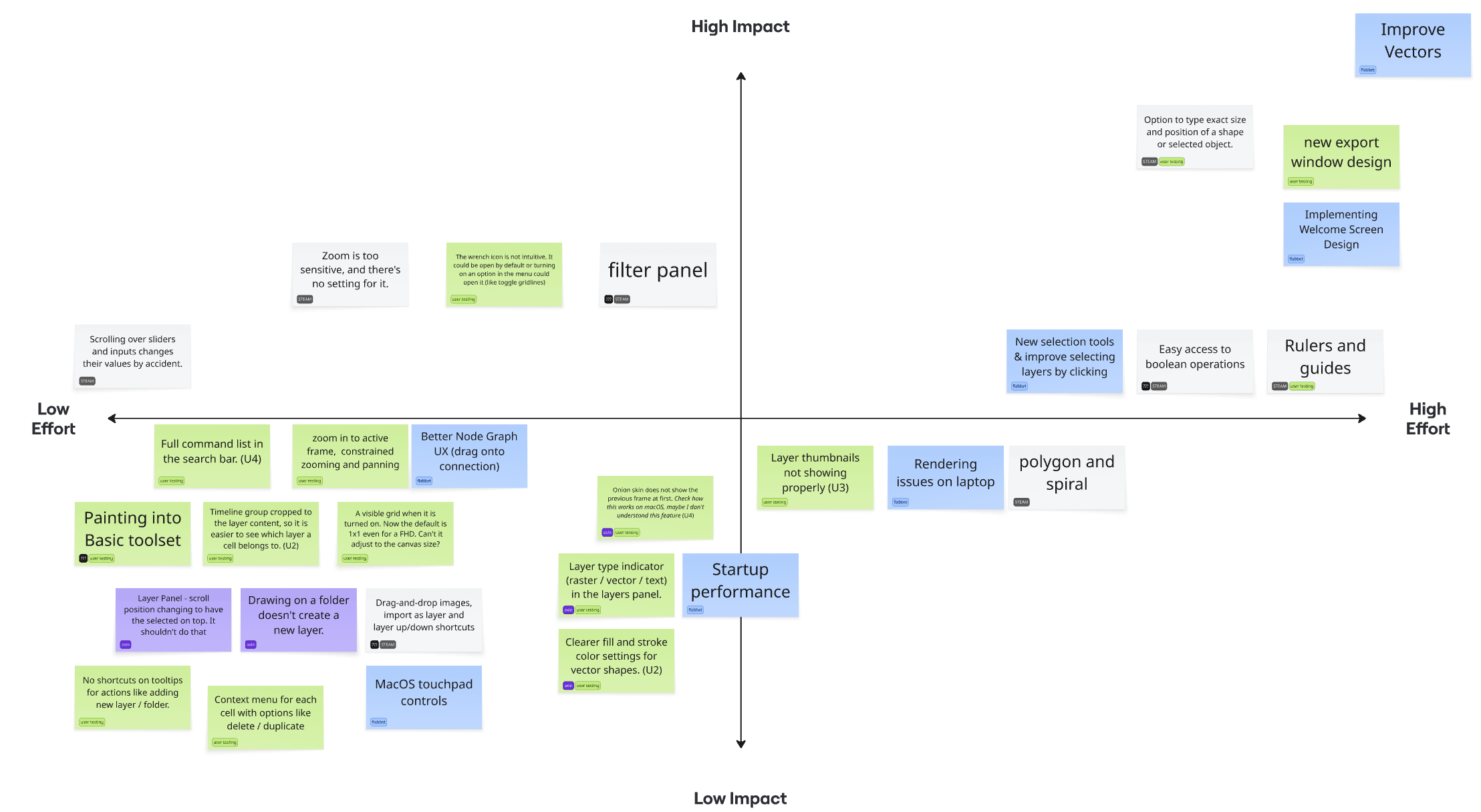
We’ve ranked each change by its impact and effort to make. It helps us prioritize work. It’s not perfect, but good enough. Some of the changes will go directly to version 2.1 and some will wait for the 2.2 release.
Inktober
I was struggling to motivate myself to draw consistently – axin
If this sounds familiar, Inktober might be something interesting for you. It’s a challenge to draw each day based on daily prompts. It’s an event that millions of artists participate in. It’s already half of the month, but you can always join! We’ve a special channel on our Discord server for it. We are sharing artworks made in PixiEditor posted there on our Mastodon and Twitter/X.
Alignments
All right, some development news time. In the previous month, I managed to push a dev update with new alignment features, which help with aligning multiple layers together.
It’s already available on the dev channel to test!
Text Rework
This is a pretty big thing. I’ll be honest, I underestimated the amount of work of this thing. The original idea was to just add text alignment options, as this was often mentioned as missing. I thought, “eh, if I am touching text, I might as well improve it a bit more”.
Right now, if you want to have text with different colors, fonts, or any other settings, you need a separate layer for each. It’s far from being ideal and requires a lot of patience to get right.
It should work like in text processors, where you select a part of the text and just change the settings for a selection. And this is what I decided to do.
Boy oh boy, this was quite a rabbit hole. It required adjusting everything related to text. Editing, rendering, SVG export and import, overlays, converting to curves, shape data recoloring, extracting characters, and much more.
It took me about 3 weeks, if not more.
Well, not only this, but in the meantime I also decided to add the mentioned text alignment and various other settings like proper font styles and a new font picker UI.
In the new picker, you can mark fonts as favourite, search for fonts, and live preview by hovering.
Token Beam
In the meantime of the meantime, I wanted to play around with the token beam. It’s a fun technology made by David Aerne (meodai), a very talented programmer focused on color theory and colors in general. Shoutout to him for great work.
Its purpose is to connect external color pickers/palette generators with target graphics software. So for example, I can use this website to pick my colors for a palette and see it immediately update in PixiEditor.
An experimental extension is available now. It is only working with the dev version as of today. (version >=2.2), so you might need to update to be able to install it.
Let me know what you think!
What’s next
So as I described in the first section of this blog post, we’re currently focusing on polishing things and adding new QoL features. One of the biggest challenges that we are gonna face soon is vector improvements, so you can actually comfortably create and edit vectors.
Stay tuned for the next dev update!