
Project Polish and 3D | PixiEditor September Status

September 4, 2026
Hi, hello and welcome! What a great day for some news and PixiStories. On today’s menu:
- Project Polish (v2.2) - a roadmap for stable, friendly and polished PixiEditor,
- Drawie 2 - an upgrade for our rendering technology,
- Vertie - an experimental 3D backend for Drawie,
- Arco - a brand new drawing backend, made from scratch. Why and how.
Let’s get into it!
Project Polish
Despite the name, it’s not a lesson about how to pronounce “Brzęczyszczykiewicz”. Yes, PixiEditor is made in Poland, and yes, I am Polish, but that’s just a coincidence.
Anyway, Project Polish is our roadmap to fix most of the rough edges of the app, from missing basic features to UX improvements and long-standing bugs. Additionally, we’re finally preparing proper tutorials, aka “PixiEditor Essentials”. In fact, the very first UI walkthrough is already available on our docs! YouTube version is on the finish line.
So, what should you expect from version 2.2? On our internal roadmap, we have things like:
- Layer locking
- Alignment options (center elements within selection horizontally, vertically, etc.)
- More text options (inlines, alignment, kerning, variable fonts, proper emoji-within-font support and more)
- Filters panel for quick layer filter compositing
- Improved vector workflow and more vector tools like knife, fill, quick bool operations and expand to stroke
- Better Node Graph UX (layout management, insert node on connection)
- New selection tools
- Improved touchscreen and touchpad controls
- Upgrade to Avalonia 12 (Linux drag and drop, better performance and stability)
- Improved welcome screen
- Startup and in-app performance improvements
- Better clipboard support when it comes to copying and pasting to/from other apps
- General UI polish
It is not the final roadmap for version 2.2. It’s our internal milestone that we want to accomplish for version 2.2. There are some interesting community proposals open, which we are planning to go over soon and update the roadmap on the website. Take a look and vote for your favourites. It’s not too late!
Some of the things from Project Polish we’ve already implemented, but not yet released. For example
Avalonia 12 and UI improvements for Linux
Previously, PixiEditor had a Windows-like title bar on Linux, which does not fit the ecosystem. With the Avalonia 12 upgrade, I’ve decided to refresh its look.

Additionally, on some distros with disabled system title bars, PixiEditor’s popups did not have borders and blended with the background. It’s a small thing, but adding borders really improves the overall feeling.
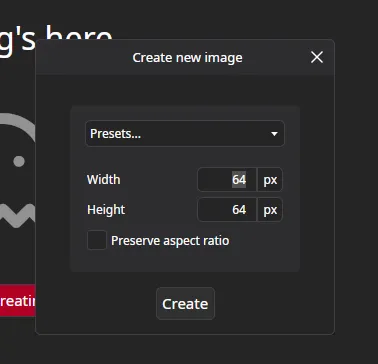
One of the biggest UX issues on Linux so far was non-working drag-and-drop. It was a limitation of Avalonia 11, and with the version 12 upgrade, we can finally drop our precious files!
Avalonia 12 also brings experimental Wayland support. I did try enabling it and testing it. However, for now it’s not usable with PixiEditor. We’ll have to wait for it to get a bit more mature and adjust our rendering tech for it as well.
Some juiciness
I come from a game dev background, and the term “juicy” is used a lot in the context of visual feedback of game elements in response to user input. In other words, how squishy and satisfying the interactions are visually. Avalonia’s animation system is pretty powerful, but extremely unfun to use. The mental strain to add the most basic interaction is too big for me to usually do it in between more important tasks.
To be honest, this applies to the majority of UI frameworks I’ve used. At least without any plugins and external packages.
But one day, I saw this GodotHub app, which does an excellent job of creating satisfying and juicy UI. It was the push I needed to actually do something about
the lack of an easy way to juice up things in PixiEditor. So, in one evening I coded a simple solution called Juicy.
With it, adding animations is stupidly simple. Let’s take a look at the tool buttons.
All it took to add this was:
Juice.Animations="Loaded:PopIn"The majority of icon buttons in the app now respond to your clicks!
The syntax follows “event:animation” schema. It is also possible to specify multiple animations within one element by separating them with ;.
Well anyway, I won’t bore you with technical details. All that matters is that it is very easy to add juiciness to the app, which I am happy about and hopefully use more often.
Drawie 2
Drawie is what powers PixiEditor. It’s a technology we built from scratch and have great plans for. In essence, Drawie in its current form is a library that talks to your GPU and sets up a library called Skia, which does the actual rendering. Drawie introduces a few useful concepts on top of Skia, which makes the development easier.
In the context of PixiEditor, Drawie talks to Avalonia, asks for the GPU, sets up Skia, and forwards all rendering (like Draw Rectangle) to it. Then it takes the result and gives it back to Avalonia for you to see.
Outside of PixiEditor, Drawie is also a standalone platform. It does not require any UI framework and allows rendering things on the screen in different environments (like a standalone desktop app or in the browser). So you can pretty much build your own UI framework, app, or 2D game that will run on desktops and browsers. Drawie takes care of creating windows, managing input, and displaying your 2D graphics.
Well, that’s at least the idea of it. The standalone platform already works, but is far from being complete or even semi-complete. I did manage to get it to the point where I could use it for my internal needs.
The challenges we faced for PixiEditor taught us a lot about graphics APIs, limitations, and rendering in general. I want to take Drawie to the next level. The next 2 sections of this blog are examples of what I want Drawie 2 to be and what it can give you in terms of PixiEditor.
Vertie - introducing 3D backend for Drawie
At the beginning of the month, I was supposed to be in the mountains, a longer break from coding and managing the project. Well, I was, but after a few days I sprained my ankle and was forced to go back in front of the computer. Well, I guess the world has decided that touching grass is not for me.
I didn’t want to go back to the usual bug fixing and implementing requested features. After all, I was supposed to be outside for the next 2 weeks. So I decided to experiment a little and do some stuff I find fun and a little challenging.
Why not add 3D rendering to Drawie? Making a 3D renderer is already a fun thing, but not too hard itself. The more challenging part was adding a 3D pipeline and integrating it with Skia. My goal was to build it so it feels like it is an integral part of the library instead of an external feature glued together with existing stuff.
I must say, I haven’t felt this kind of focus in a long time. For almost 2 weeks, I was hyperfocused and worked on it like 14 hours a day or so. Truly one in a decade state.
Okay, story time over, here’s the result!
“Shiba” (https://skfb.ly/6WxVW) by zixisun02 is licensed under Creative Commons Attribution (http://creativecommons.org/licenses/by/4.0/).
This is a Drawie window with a 3D scene. I even took some time and built a C# ImGui-like library for some simple UI. This is all great, but it doesn’t seem too impressive by itself.
So I decided to swap out the old Drawie with a new Drawie inside PixiEditor and quickly coded a simple node for rendering a 3D scene. Then I plugged a texture as an input and made a very simple 3D texturing workspace for any 3D model. At least a prototype.
As I said, this is far from being production-ready. It’s just my little experiment. However, experiments like these usually make their way into the final codebase. Eventually.
“Why 3D inside a 2D app?” you may ask.
PixiEditor is a 2D graphics editor and uses a 2D graphics rendering library, but that doesn’t mean rendering 3D scenes is not useful for 2D. Quite the opposite. Clip Studio Paint, for example has a full-blown 3D feature set for concept art.
It is especially useful when working with textures and materials for games.
“But there is 3D in PixiEditor already. Skybox designer and 3D cube texturing workspace already have it!” - true, true, but it’s not a “real” 3D. There is no vertex stage and no real 3D models. Everything is made in the fragment shader, meaning I can’t just swap out a cube for any other model. It is limited to the most basic 3D shapes, and each of them would require its own dedicated shader.
“So, when can I use it?” - I don’t know yet. The experiment is very promising, but it’s too early to say. I’ll keep you posted! Subscribe to the newsletter to get updates as soon as they show up.
Join our newsletter to stay up to date!
Don’t worry, we don’t have time to spam you. Only high quality content!
Arco - bye bye Skia!
Since early versions of PixiEditor 1.0, we’ve used Skia for rendering in PixiEditor. Every shape, pen stroke, and pixel is drawn by it. It is an amazing library made by Google, and if you are using a Chromium-based browser (Google Chrome, Brave, Opera), you use it every day. It’s fast, well supported, and has tons of features.
But we want to replace it with our own renderer.
Well, we’ve wanted to for a couple of years now, but in my head it felt impossible, or at least overwhelming. I swore this was the last thing I wanted to reinvent from scratch.
Yet here we are…
Why do we want to replace it if it’s so great?
It’s a good question. Like with many general-purpose tools, they are great and make life easier until they do not. We pushed the limits of Skia with PixiEditor, both performance-wise and feature-wise. There are a lot of compromises we had to make in order to get some features working.
I exaggerated a little with the title of this section. We’re not saying goodbye to Skia, just not yet, and probably not for many months, if not years. Thankfully, we can approach this incrementally, meaning that we can replace some parts of Skia with our own library and leave Skia in other parts. So, instead of making a big jump after, let’s say, 2 years, we can replace one small thing in 3 months, and slowly replace all other parts later on.
We’re particularly interested in checking out if we can make Arco (working title, subject to change) do image processing with unpremultiplied alpha textures. Premultiplying color data makes various image processing operations easier. This is what Skia operates on. In fact, it is illegal in Skia to do processing on unpremultiplied textures.
One of the downsides is color precision loss. If we take an Rgba8 surface (8 bytes per channel) and premultiply it, we can lose color data on lower alpha pixels due to rounding errors. To offset the problem, we can use an Rgba16 (16 bytes per channel) texture, but it takes twice as much memory.
If we’d be able to design Arco to work with straight (unpremultiplied) color data, we’ll be able to halve memory consumption in PixiEditor. We don’t even have to completely get rid of premultiplication and likely even can’t, but if at least one part of the pipeline can work on unpremul surfaces, you’ll benefit from this. Skia, on the other hand, completely forbids this.
Other things that Arco can help us with:
- Specialized optimizations for PixiEditor,
- Better integration with Vertie,
- More robust and capable custom shader language,
- Independence from Skia/SkiaSharp bugs and development cycle,
- Fewer dependencies and a lighter PixiEditor binary
Arco is in a very, very early development stage. There’s a lot we don’t know and many challenges are ahead of us, but again, it’s very fun and exciting to finally do it. I’ll keep you posted!
If you are experienced with rendering, computer graphics, and especially Vulkan, please join our Discord and let’s get in touch!
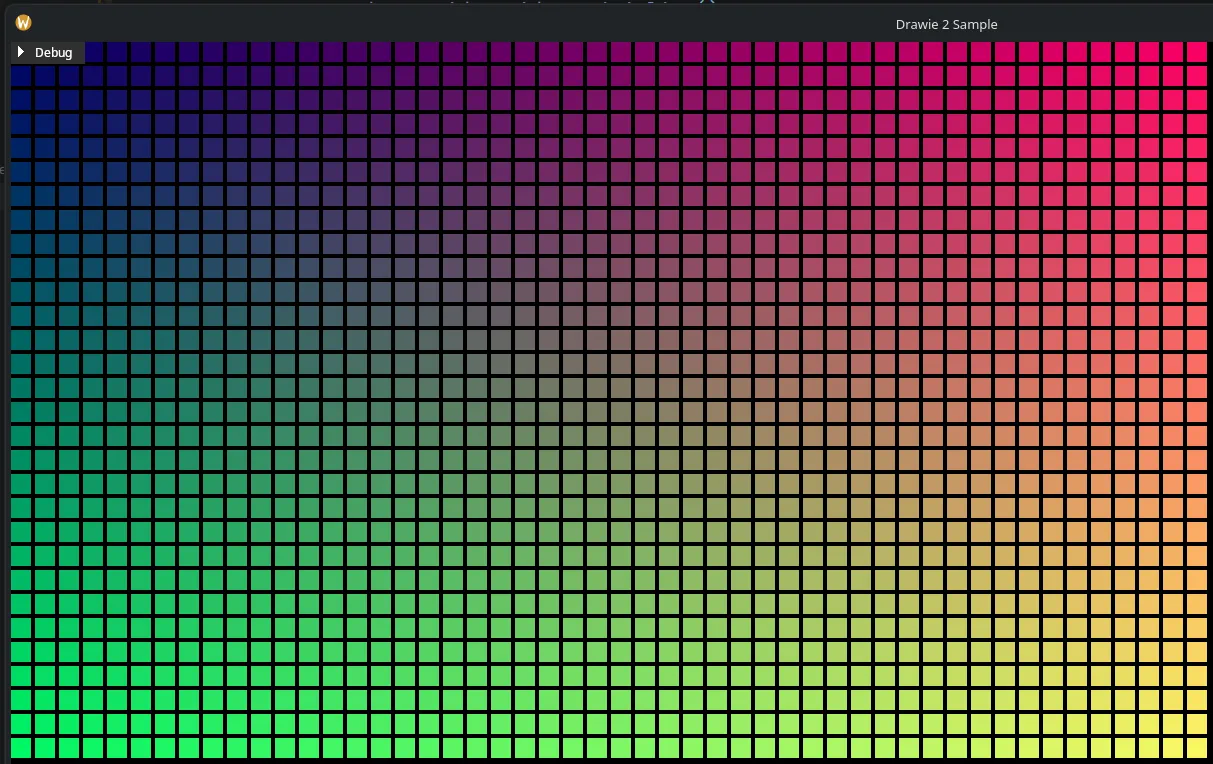
Here are some shiny rectangles rendered with Arco
Sum
2 + 2 = 5
Summary
If you are interested in any of the topics discussed, join the newsletter and consider supporting our work financially with Pixi Pack or by spreading the word! PixiEditor and all related things are my passion, and it is only possible to continue doing it thanks to all of you.