

Expose Value
Expose Value
Section titled “Expose Value” Category Workspace
Is Pair Node: No
Exposes a value from the node graph, making it accessible outside of the graph.
What does it mean to expose a value?
Section titled “What does it mean to expose a value?”Since version 2.1, PixiEditor document (.pixi file) can be embedded into other documents. This allows you to create reusable node graphs that can be used across multiple documents.
When you expose a value, you are basically creating an output for your node.
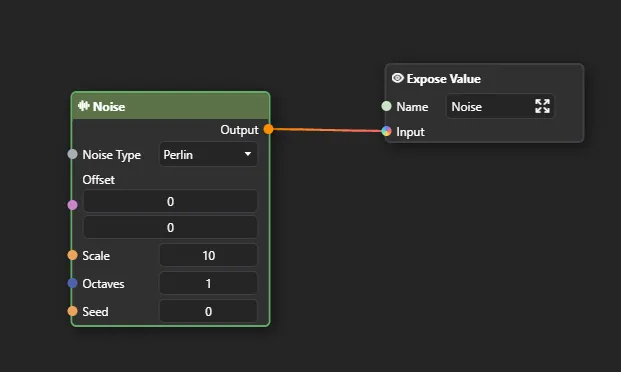
So now, when you use this document in another document, you can access the exposed value as an output
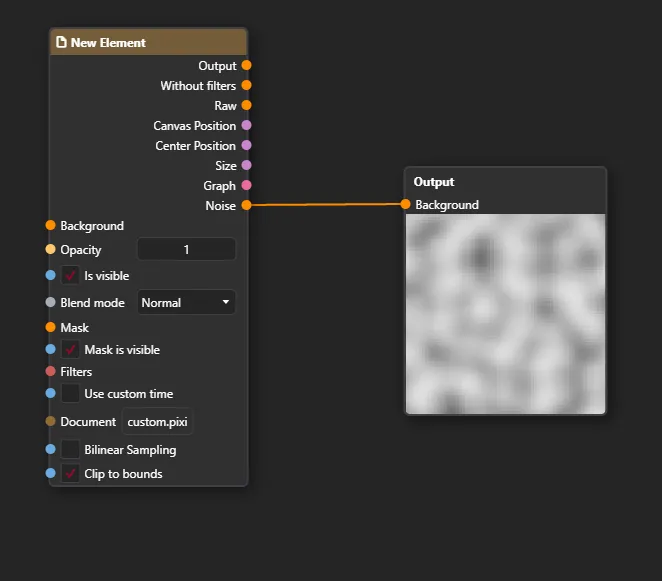
Inputs
Section titled “Inputs” Type: String
Default: ""
Name of the value to expose. This is used to identify the value in the context and should be unique within the graph.
Input
Section titled “ Input ” Type: Object
Default: null
The value to expose. This can be any type of data that you want to make accessible outside the node graph.
Outputs
Section titled “Outputs”All of our content is carefully written by hand, no AI was involved during the process.